Part 1: Hacking a Feit SEC3000 Floodlight Wifi Camera
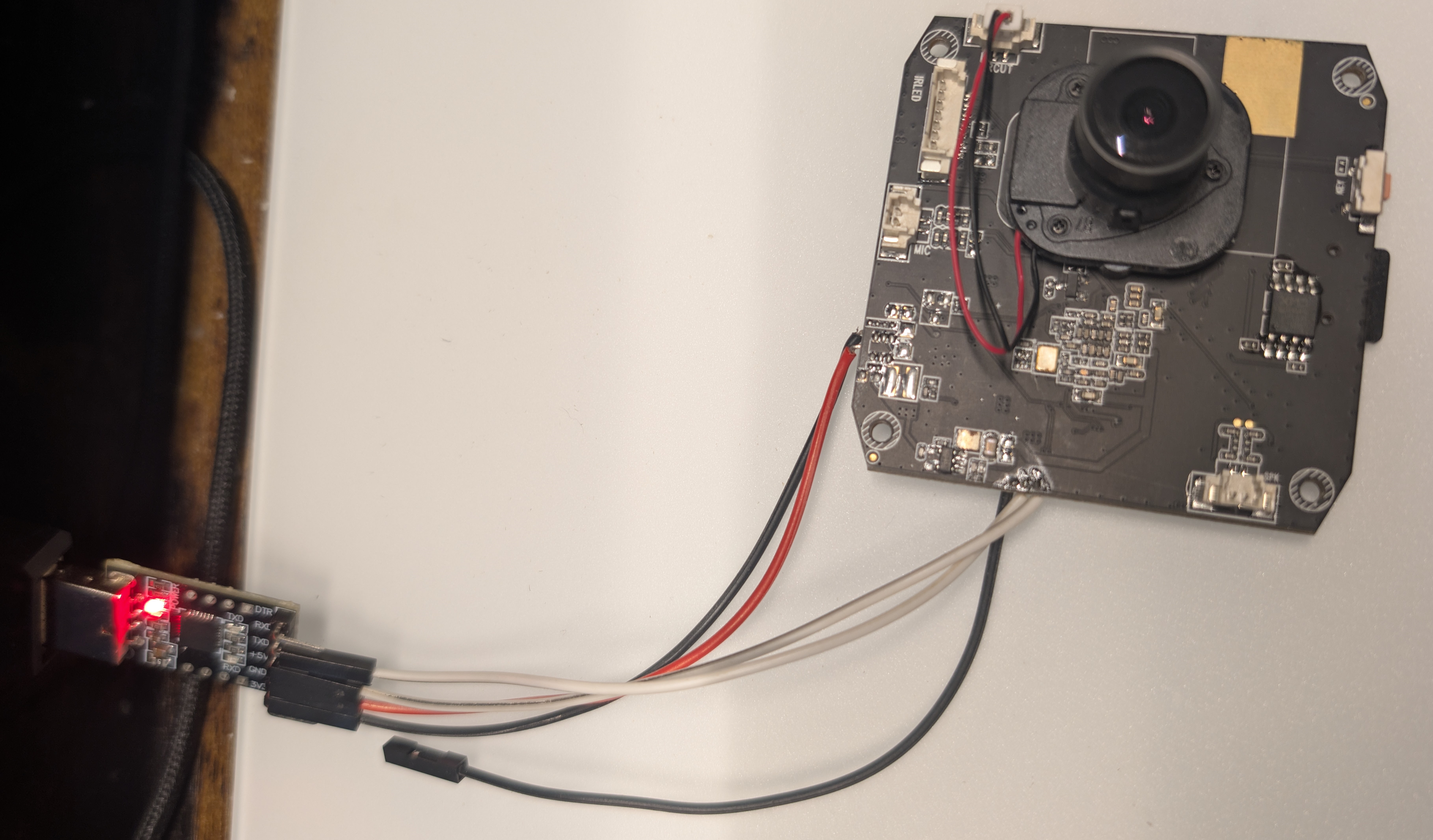 Feit SEC3000 attached to UART to USB adapter
I've been planning to moving most of my wifi cameras onto Home Assistant + Frigate for some time now to be able to manage them locally. The issue with these cameras is that they usually run Tuya firmware, so they are pretty much always attached to the cloud.
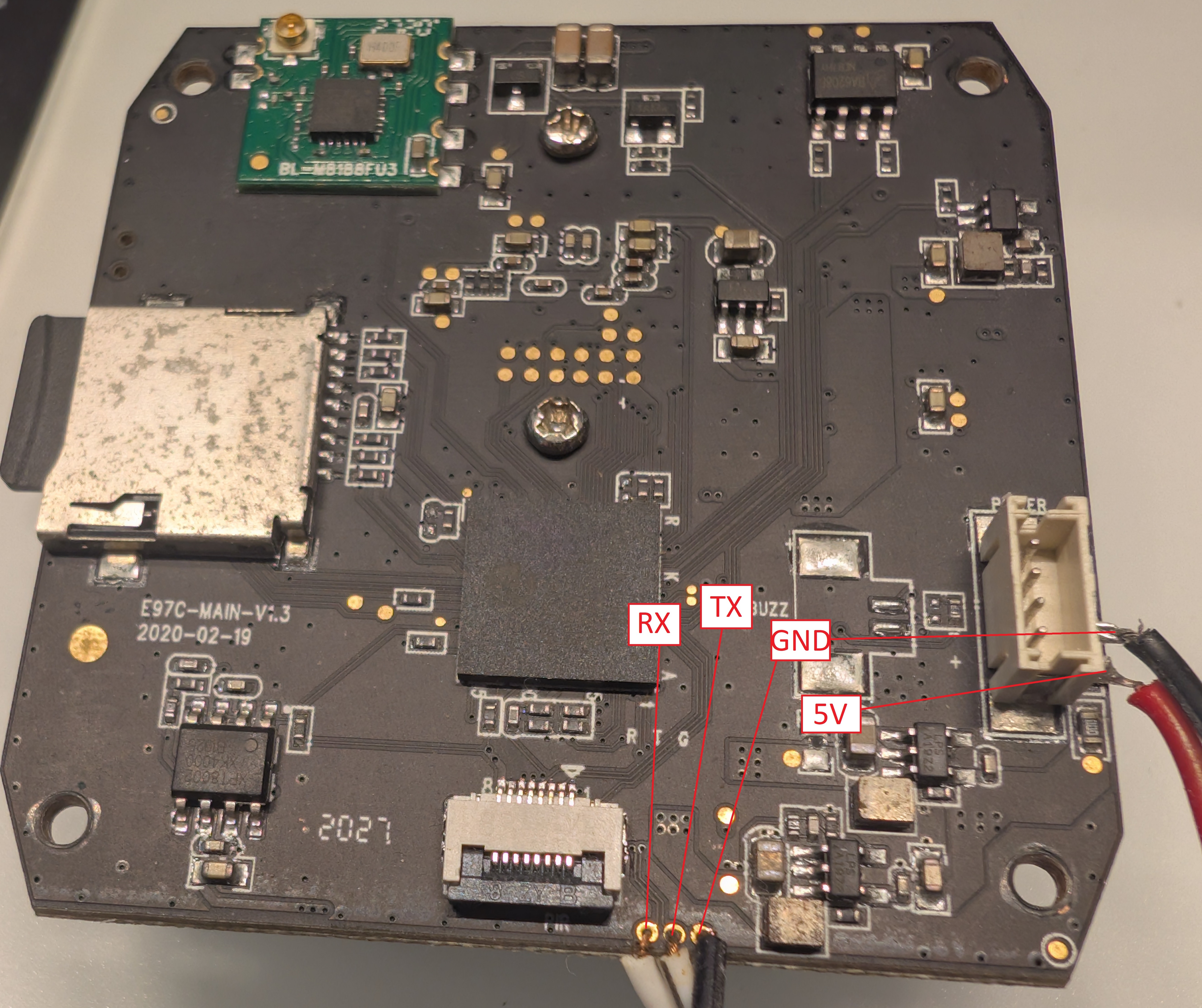 Feit SEC3000 pinout
If you're lucky, some of these cameras (and IoT devices in general) have debug pins so you can snoop around inside a shell.
This Feit SEC3000 happens to have no password on the shell so you can freely interrupt boot and run whatever you want.
Here's a quick snippet of what this camera logs (warning, lots of lines)
Ok


System startup


U-Boot 2010.06 (May 21 2019 - 16:32:07)

Check Flash Memory Controller v100 ... Found
SPI Nor(cs 0) ID: 0x20 0x70 0x18
Block:64KB Chip:128MB Name:"xm25qh128a"
SPI Nor total size: 128MB
Cannot found a valid SPI Nand Device
MMC:
EMMC/MMC/SD controller initialization.
Card did not respond to voltage select!
No EMMC/MMC/SD device found !
In:    serial
Out:   serial
Err:   serial
Hit any key to stop autoboot:  0
131072 KiB hi_fmc at 0:0 is now current device

## Booting kernel from Legacy Image at 82000000 ...
  Image Name:   Linux-3.4.35
  Image Type:   ARM Linux Kernel Image (uncompressed)
  Data Size:    1701032 Bytes = 1.6 MiB
  Load Address: 80008000
  Entry Point:  80008000
  Loading Kernel Image ... OK
OK

Starting kernel ...

Uncompressing Linux... done, booting the kernel.
Booting Linux on physical CPU 0
Linux version 3.4.35 (root@localhost.localdomain) (gcc version 4.8.3 20131202 (prerelease) (Hisilicon_v300) ) #33 Thu Dec 14 17:47:02 CST 2017
CPU: ARM926EJ-S [41069265] revision 5 (ARMv5TEJ), cr=00053177
CPU: VIVT data cache, VIVT instruction cache
Machine: hi3518ev200
Memory policy: ECC disabled, Data cache writeback
Built 1 zonelists in Zone order, mobility grouping on.  Total pages: 8890
Kernel command line: mem=35M console=ttyAMA0,115200 root=/dev/mtdblock2 rootfstype=squashfs mtdparts=hi_sfc:192K(boot),1664K(kernel),4096K(rootfs),10432K(app)
PID hash table entries: 256 (order: -2, 1024 bytes)
Dentry cache hash table entries: 8192 (order: 3, 32768 bytes)
Inode-cache hash table entries: 4096 (order: 2, 16384 bytes)
Memory: 35MB = 35MB total
Memory: 30932k/30932k available, 4908k reserved, 0K highmem
Virtual kernel memory layout:
    vector  : 0xffff0000 - 0xffff1000   (   4 kB)
    fixmap  : 0xfff00000 - 0xfffe0000   ( 896 kB)
    vmalloc : 0xc2800000 - 0xff000000   ( 968 MB)
    lowmem  : 0xc0000000 - 0xc2300000   (  35 MB)
    modules : 0xbf000000 - 0xc0000000   (  16 MB)
      .text : 0xc0008000 - 0xc03ec000   (3984 kB)
      .init : 0xc03ec000 - 0xc040a044   ( 121 kB)
      .data : 0xc040c000 - 0xc0438bc0   ( 179 kB)
      .bss : 0xc0438be4 - 0xc046acc0   ( 201 kB)
SLUB: Genslabs=13, HWalign=32, Order=0-3, MinObjects=0, CPUs=1, Nodes=1
NR_IRQS:32
VIC @fe0d0000: id 0x00641190, vendor 0x41
sched_clock: 32 bits at 49MHz, resolution 20ns, wraps every 86767ms
Console: colour dummy device 80x30
Calibrating delay loop... 269.10 BogoMIPS (lpj=1345536)
pid_max: default: 32768 minimum: 301
Mount-cache hash table entries: 512
Initializing cgroup subsys freezer
CPU: Testing write buffer coherency: ok
Setting up static identity map for 0x8030af80 - 0x8030afd8
dummy:
NET: Registered protocol family 16
Serial: AMBA PL011 UART driver
uart:0: ttyAMA0 at MMIO 0x20080000 (irq = 5) is a PL011 rev2
console [ttyAMA0] enabled
uart:1: ttyAMA1 at MMIO 0x20090000 (irq = 30) is a PL011 rev2
uart:2: ttyAMA2 at MMIO 0x200a0000 (irq = 25) is a PL011 rev2
bio: create slab <bio-0> at 0
SCSI subsystem initialized
hi-spi-master hi-spi-master.0: with 1 chip select slaves attached
hi-spi-master hi-spi-master.1: with 2 chip select slaves attached
usbcore: registered new interface driver usbfs
usbcore: registered new interface driver hub
usbcore: registered new device driver usb
cfg80211: Calling CRDA to update world regulatory domain
Switching to clocksource timer0
NET: Registered protocol family 2
IP route cache hash table entries: 1024 (order: 0, 4096 bytes)
TCP established hash table entries: 2048 (order: 2, 16384 bytes)
TCP bind hash table entries: 2048 (order: 1, 8192 bytes)
TCP: Hash tables configured (established 2048 bind 2048)
TCP: reno registered
UDP hash table entries: 256 (order: 0, 4096 bytes)
UDP-Lite hash table entries: 256 (order: 0, 4096 bytes)
NET: Registered protocol family 1
squashfs: version 4.0 (2009/01/31) Phillip Lougher
jffs2: version 2.2. (NAND) © 2001-2006 Red Hat, Inc.
msgmni has been set to 60
alg: No test for stdrng (krng)
Block layer SCSI generic (bsg) driver version 0.4 loaded (major 254)
io scheduler noop registered
io scheduler deadline registered (default)
io scheduler cfq registered
brd: module loaded
Check Flash Memory Controller v100 ...  Found.
SPI Nor(cs 0) ID: 0x20 0x70 0x18
Block:64KB Chip:128MB Name:"xm25qh128a"
hifmc100_get_spi_lock_info(848): Error:The ID: 0x20 isn't in the BP table,
hifmc100_get_spi_lock_info(849): Current device can't not protect
SPI Nor total size: 128MB
4 cmdlinepart partitions found on MTD device hi_sfc
4 cmdlinepart partitions found on MTD device hi_sfc
Creating 4 MTD partitions on "hi_sfc":
0x000000000000-0x000000030000 : "boot"
0x000000030000-0x0000001d0000 : "kernel"
0x0000001d0000-0x0000005d0000 : "rootfs"
0x0000005d0000-0x000001000000 : "app"
himii: probed
ehci_hcd: USB 2.0 'Enhanced' Host Controller (EHCI) Driver
hiusb-ehci hiusb-ehci.0: HIUSB EHCI
hiusb-ehci hiusb-ehci.0: new USB bus registered, assigned bus number 1
hiusb-ehci hiusb-ehci.0: irq 15, io mem 0x100b0000
hiusb-ehci hiusb-ehci.0: USB 0.0 started, EHCI 1.00
hub 1-0:1.0: USB hub found
hub 1-0:1.0: 1 port detected
ohci_hcd: USB 1.1 'Open' Host Controller (OHCI) Driver
hiusb-ohci hiusb-ohci.0: HIUSB OHCI
hiusb-ohci hiusb-ohci.0: new USB bus registered, assigned bus number 2
hiusb-ohci hiusb-ohci.0: irq 16, io mem 0x100a0000
hub 2-0:1.0: USB hub found
hub 2-0:1.0: 1 port detected
mousedev: PS/2 mouse device common for all mice
i2c /dev entries driver
hisi_i2c hisi_i2c.0: Hisilicon [i2c-0] probed!
hisi_i2c hisi_i2c.1: Hisilicon [i2c-1] probed!
hisi_i2c hisi_i2c.2: Hisilicon [i2c-2] probed!
TCP: cubic registered
Initializing XFRM netlink socket
NET: Registered protocol family 17
NET: Registered protocol family 15
lib80211: common routines for IEEE802.11 drivers
Registering the dns_resolver key type
SQUASHFS error: Xattrs in filesystem, these will be ignored
SQUASHFS error: unable to read xattr id index table
VFS: Mounted root (squashfs filesystem) readonly on device 31:2.
Freeing init memory: 120K

            _ _ _ _ _ _ _ _ _ _ _ _
            \  _  _   _  _ _ ___
            / /__/ \ |_/
          / __   /  -  _ ___
          / /  / /  / /
  _ _ _ _/ /  /  \_/  \_ ______
___________\___\__________________
aoni_root_fs v20171129 general rootfs for all ipc device..

[RCS]: /etc/init.d/S00devs
[RCS]: /etc/init.d/S01udev
Not recognise ACTION:change
Not recognise ACTION:change
[RCS]: /etc/init.d/S80network
[RCS]: /etc/init.d/S90hibernate
AAAAAAAAAAAAAAAAAAAAAAAAAAAAAAAAAAAAAAAAAAAAAAAAAAAAAAAAAAAAAAAAAAAAAAAAAA
=========red led on============
*** Board tools : ver0.0.1_20121120 ***
[debug]: {source/utils/cmdshell.c:166}cmdstr:himm
0x200F00F0: 0x00000000 --> 0x00000001
[END]
*** Board tools : ver0.0.1_20121120 ***
[debug]: {source/utils/cmdshell.c:166}cmdstr:himm
0x201B0400: 0x00000004 --> 0x00000010
[END]
*** Board tools : ver0.0.1_20121120 ***
[debug]: {source/utils/cmdshell.c:166}cmdstr:himm
0x201B0040: 0x00000000 --> 0x00000010
[END]
=========wifi power on=========
*** Board tools : ver0.0.1_20121120 ***
[debug]: {source/utils/cmdshell.c:166}cmdstr:himm
0x200F0078: 0x00000000 --> 0x00000000
[END]
*** Board tools : ver0.0.1_20121120 ***
[debug]: {source/utils/cmdshell.c:166}cmdstr:himm
0x20140400: 0x00000000 --> 0x00000004
[END]
*** Board tools : ver0.0.1_20121120 ***
[debug]: {source/utils/cmdshell.c:166}cmdstr:himm
0x20140010: 0x00000000 --> 0x00000000
[END]
*** Board tools : ver0.0.1_20121120 ***
[debug]: {source/utils/cmdshell.c:166}cmdstr:himm
0x20140010: 0x00000000 --> 0x00000004
[END]
usb 1-1: new high-speed USB device number 2 using hiusb-ehci
usbdev11 -> /dev/usbdev1.2
rm: can't remove '/mnt/mtd/rtl8192eu.ko': No such file or directory
RTL871X: module init start
RTL871X: rtl8188fu v4.3.23.6_20964.20170110
RTL871X: build time: Sep 13 2017 18:12:49
RTL871X: hal_com_config_channel_plan chplan:0x23
RTL871X: rtw_ndev_init(wlan0) if1 mac_addr=b4:c9:b9:46:6c:3c
usbcore: registered new interface driver rtl8188fu
RTL871X: module init ret=0
mmz_start: 0x82300000, mmz_size: 29M
rmmod: can't unload 'tlv_320aic31': unknown symbol in module, or unknown parameter
rmmod: can't unload 'hi3518e_adec': unknown symbol in module, or unknown parameter
rmmod: can't unload 'hi3518e_aenc': unknown symbol in module, or unknown parameter
rmmod: can't unload 'hi3518e_ao': unknown symbol in module, or unknown parameter
rmmod: can't unload 'hi3518e_ai': unknown symbol in module, or unknown parameter
rmmod: can't unload 'hi3518e_aio': unknown symbol in module, or unknown parameter
rmmod: can't unload 'acodec': unknown symbol in module, or unknown parameter
remove audio
rmmod: can't unload 'pwm': unknown symbol in module, or unknown parameter
rmmod: can't unload 'hi3518e_ive': unknown symbol in module, or unknown parameter
rmmod: can't unload 'hi3518e_rc': unknown symbol in module, or unknown parameter
rmmod: can't unload 'hi3518e_jpege': unknown symbol in module, or unknown parameter
rmmod: can't unload 'hi3518e_h264e': unknown symbol in module, or unknown parameter
rmmod: can't unload 'hi3518e_chnl': unknown symbol in module, or unknown parameter
rmmod: can't unload 'hi3518e_venc': unknown symbol in module, or unknown parameter
rmmod: can't unload 'hifb': unknown symbol in module, or unknown parameter
rmmod: can't unload 'hi3518e_vou': unknown symbol in module, or unknown parameter
rmmod: can't unload 'hi3518e_vpss': unknown symbol in module, or unknown parameter
rmmod: can't unload 'hi3518e_viu': unknown symbol in module, or unknown parameter
rmmod: can't unload 'hi_mipi': unknown symbol in module, or unknown parameter
rmmod: can't unload 'hi3518e_vgs': unknown symbol in module, or unknown parameter
rmmod: can't unload 'hi3518e_region': unknown symbol in module, or unknown parameter
rmmod: can't unload 'hi3518e_tde': unknown symbol in module, or unknown parameter
rmmod: can't unload 'piris': unknown symbol in module, or unknown parameter
rmmod: can't unload 'hi3518e_isp': unknown symbol in module, or unknown parameter
rmmod: can't unload 'hi3518e_sys': unknown symbol in module, or unknown parameter
rmmod: can't unload 'hi3518e_base': unknown symbol in module, or unknown parameter
rmmod: can't unload 'hi_media': unknown symbol in module, or unknown parameter
rmmod: can't unload 'mmz': unknown symbol in module, or unknown parameter
Hisilicon Media Memory Zone Manager
Module himedia: init ok
hi3518e_base: module license 'Proprietary' taints kernel.
Disabling lock debugging due to kernel taint
load sys.ko for Hi3518EV200...OK!
load tde.ko ...OK!
load region.ko ....OK!
ISP Mod init!
load viu.ko for Hi3518EV200...OK!
load vpss.ko ....OK!
load rc.ko for Hi3518EV200...OK!
load venc.ko for Hi3518EV200...OK!
load chnl.ko for Hi3518EV200...OK!
load h264e.ko for Hi3518EV200...OK!
load jpege.ko for Hi3518EV200...OK!
load ive.ko for Hi3518EV200...OK!
==== Your input Sensor type is gc2033 ====
*** Board tools : ver0.0.1_20121120 ***
[debug]: {source/utils/cmdshell.c:166}cmdstr:himm
0x200f0040: 0x00000000 --> 0x00000002
[END]
*** Board tools : ver0.0.1_20121120 ***
[debug]: {source/utils/cmdshell.c:166}cmdstr:himm
0x200f0044: 0x00000000 --> 0x00000002
[END]
*** Board tools : ver0.0.1_20121120 ***
[debug]: {source/utils/cmdshell.c:166}cmdstr:himm
0x200f007c: 0x00000000 --> 0x00000001
[END]
*** Board tools : ver0.0.1_20121120 ***
[debug]: {source/utils/cmdshell.c:166}cmdstr:himm
0x200f0080: 0x00000000 --> 0x00000001
[END]
*** Board tools : ver0.0.1_20121120 ***
[debug]: {source/utils/cmdshell.c:166}cmdstr:himm
0x200f0084: 0x00000000 --> 0x00000001
[END]
*** Board tools : ver0.0.1_20121120 ***
[debug]: {source/utils/cmdshell.c:166}cmdstr:himm
0x200f0088: 0x00000000 --> 0x00000001
[END]
*** Board tools : ver0.0.1_20121120 ***
[debug]: {source/utils/cmdshell.c:166}cmdstr:himm
0x200f008c: 0x00000000 --> 0x00000002
[END]
*** Board tools : ver0.0.1_20121120 ***
[debug]: {source/utils/cmdshell.c:166}cmdstr:himm
0x200f0090: 0x00000000 --> 0x00000002
[END]
*** Board tools : ver0.0.1_20121120 ***
[debug]: {source/utils/cmdshell.c:166}cmdstr:himm
0x200f0094: 0x00000000 --> 0x00000001
[END]
*** Board tools : ver0.0.1_20121120 ***
[debug]: {source/utils/cmdshell.c:166}cmdstr:himm
0x2003002c: 0x000C4003 --> 0x000B4001
[END]
acodec inited!
insert audio
mipi_init
init phy power successful!
load hi_mipi driver successful!
==== Your input Sensor type is gc2033 ====
PIR gpio init success
PIR driver init successful
If you want to run app by yourself, please input q
=======================Press q -> Entry ?Auto login as root ...
=========Daemon  Make On Jun  2 2021 11:43:45
[daemon_pth_func:504] This thread id: 1072
Welcome to HiLinux.
None of nfsroot found in cmdline.
~ #
Okay, so from this point on, what can you do? If you were trying to cut the cloud from your IP camera, the most logically thing to do now is figure out how to locally access the video stream.
There are many ways about this, the most common for these devices is finding or enabling a RTSP stream.
...but in this case I kind of got lucky. This device revision and firmware version (v0.3.9) has the RTSP stream enabled.
So what is even the point? Well, I actually bought this camera to experiment on because I have another Feit SEC3000 which was originally bought from Costco. That one in particular does not have a RTSP stream enabled, and the firmware version is higher (v0.5.2).
So lucky for me, I can replace my existing camera with this one with the RTSP stream. But before I do that, I want to play around with this earlier revision and see if I can modify the newer revision to enable a RTSP stream.
Entering the Shell
If you want to run app by yourself, please input q
=======================Press q -> Entry ?q
Auto login as root ...
Welcome to HiLinux.
None of nfsroot found in cmdline.
~ #
Since this shell has root access, we are pretty much free to do what we want.
I first began digging around to see if I can create a fake update file that can be placed in the SD Card. It is pretty common for some of these older Tuya cameras to search for update files on the SD Card.
Browsing the output of the shell when it autostarts the camera software, I found some key files:
/mnt/mtd/daemon- this appears to be pretty standard for tuya devices/mnt/mtd/aoni_ipc.sh- this appears to start the camera program 'aoni_ipc'
So let's search around these filenames.
~ # grep -a -o -E '[a-zA-Z0-9_\-\/\.]+\.(bin|ini|txt|img)' /mnt/mtd/daemon
/mnt/mtd/SystemConfig.ini
/mnt/sd_card/update/IDpool.txt
~ #
~ # grep -a -o -E '[a-zA-Z0-9_\-\/\.]+\.sh' /mnt/mtd/daemon
/mnt/sd_card/update/fireware/update.sh
/mnt/sd_card/productmode/productmode.sh
/mnt/mtd/aoni_ipc.sh
~ #
Bingo, it looks like /mnt/mtd/daemon calls for an update shell script.
/mnt/sd_card/update/fireware/update.sh - It looks like they made a typo 'firmware'
So let's craft a simple payload and drop it in our SD card, for starters, lets start telnetd:
#!/bin/sh
# Main file where we run our own stuff

SD_PATH="/mnt/sd_card/update/fireware"

echo "pwned"

telnetd -l /bin/sh -p 23 &
...and yep, it works.
At this point, I was up all night crafting random scripts and files to make it an easy drop-in. I have provided the files here, hopefully this is useful to someone in the future:
RTSP Streams
rtsp://192.168.1.X/av0_0/- HD Streamrtsp://192.168.1.X/av0_1/- SD Stream
What now?
Ideally now I would put this device on an IoT VLAN and prevent it from calling home. I would be losing some functionality through Tuya though, like 2-way audio, manually toggling floodlight, siren. But for now I think this is fine if you just need a basic RTSP stream to feed it through your NVR software.
Reminder that I have only messed with the v0.3.9 revision at this point and have not tried tampering with the newer one. If I get around to that, this blog post may be updated in the future when needed.
Also, if I figure out how to manage the GPIO pins (for stuff like enabling lights, built-in motion detect, etc.), I'll probably write up a part 2 for that.
Maybe even play around with OpenIPC...